3.4 Memory Providers
Memory Providers allow AI Agent nodes to persist and retrieve conversational context across multiple workflow runs. Instead of each agent invocation starting from a blank slate, the agent can recall prior turns, previous answers, and accumulated knowledge stored in a memory backend.
How Memory Works in Flusso
When an Agent node is configured with a Memory Provider (either directly in linear mode, or via a Memory config node in graph mode), Flusso automatically:
- Reads prior turns from the memory backend before calling the AI model, and injects them into the agent's system prompt or conversation history.
- Writes the new turn (user message + agent response) back to memory after the agent responds.
Memory is scoped by namespace. The scope determines whether memory is shared across all runs of a workflow, per individual run, per step, or globally per agent.
Supported Memory Backends
| Type | Best for | Notes |
|---|---|---|
| Redis | Fast short-term memory with TTL expiry | Requires a Redis instance. Memory auto-expires after the configured TTL (seconds). |
| SQLite | Simple file-based persistent memory | Stores turns in a local SQLite database. Good for development or single-server deployments. |
| PostgreSQL | Persistent memory using the existing application database | No extra infrastructure needed. Turns are stored in the main database. Good for production. |
| Vector Store | Semantic memory retrieval | Stores turns as vector embeddings for semantic (meaning-based) search. Requires a configured Knowledge Base. |
| Mem0 | Managed memory-as-a-service | Uses the Mem0 API. Requires a Mem0 API key and base URL. |
Adding a Memory Provider
-
Open Memory Providers settings Navigate to Settings → Memory Providers.
-
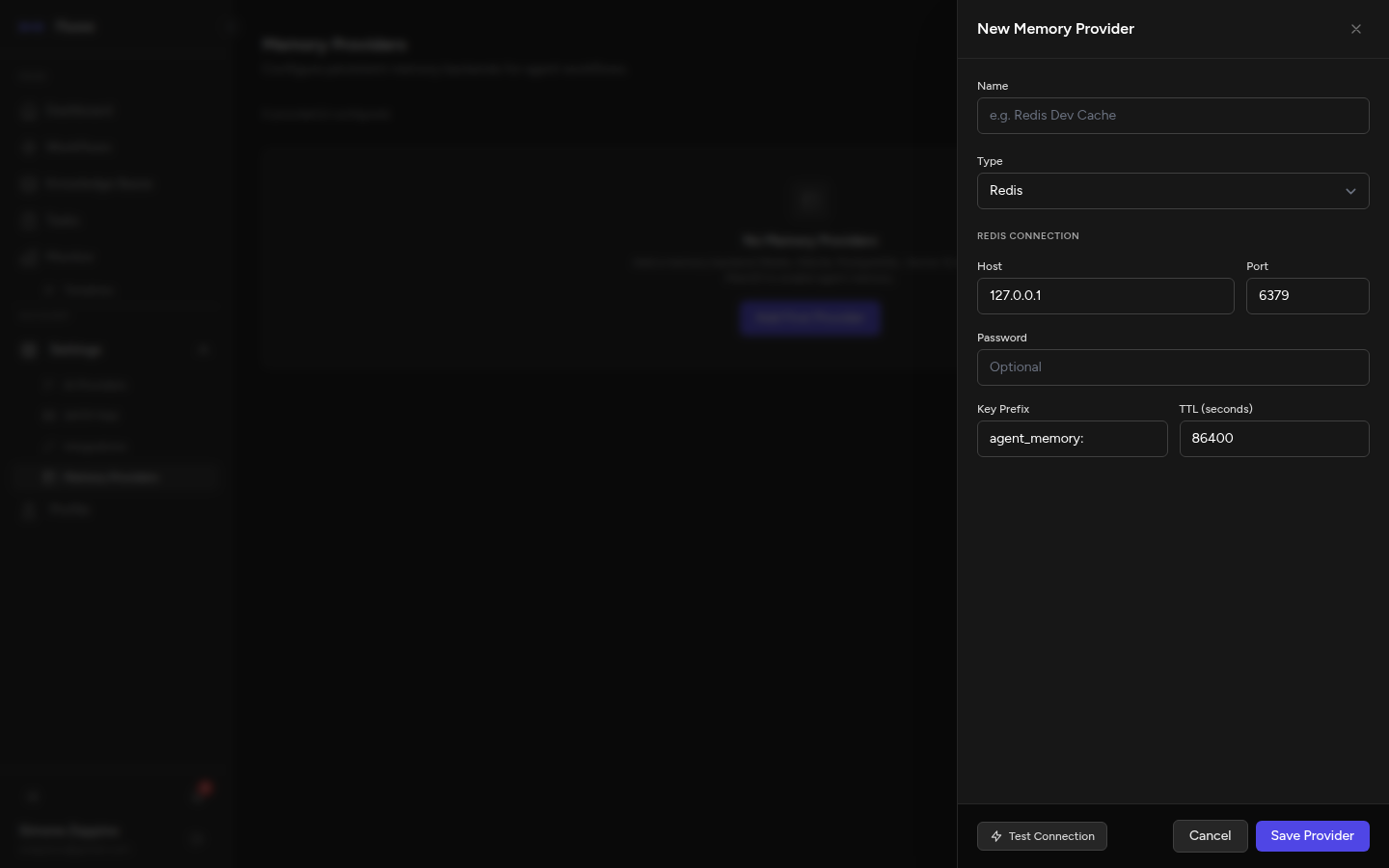
Click "New Memory Provider" A configuration drawer opens on the right.
-
Choose a type and fill in the details Select the backend type. The form will show the fields specific to that backend.
-
Save Click Save Provider. The provider now appears in the list and is available to Agent nodes throughout your account.
Configuration by Type
Redis
| Field | Description |
|---|---|
| Host | Redis server hostname (e.g. 127.0.0.1 or redis.example.com). |
| Port | Redis port, default 6379. |
| Password | Redis password, if authentication is enabled. Leave blank for no auth. |
| Key Prefix | A string prepended to all keys stored by this provider (e.g. flusso:). Helps avoid key collisions if Redis is shared. |
| TTL (seconds) | How long memory turns are retained. After this time, turns are automatically deleted. Set to 0 for no expiry. |
SQLite
| Field | Description |
|---|---|
| File Path | Absolute path to the SQLite database file on the server (e.g. /var/data/flusso-memory.db). The file is created automatically if it does not exist. |
PostgreSQL
No additional configuration is required. Flusso stores memory turns in the main application
database using the agent_memory_turns table. Simply name the provider and save.
Vector Store
| Field | Description |
|---|---|
| Knowledge Base | Select one of your configured Knowledge Bases from the dropdown. Conversation turns will be stored as vectors in this store, enabling semantic retrieval. |
| Namespace | A prefix used to isolate this provider's documents within the vector store (e.g. agent-memory). |
Mem0
| Field | Description |
|---|---|
| API Key | Your Mem0 API key from the Mem0 dashboard. |
| Base URL | The Mem0 API endpoint. Use the default unless you are self-hosting Mem0. |
| Agent ID Prefix | A string prefix applied to agent identifiers, useful to separate memories for different Flusso instances. |
Using Memory in Agent Nodes
Linear Mode
In the linear workflow editor, open the configuration drawer for an Agent node. Scroll to the Memory section. Select a configured Memory Provider from the dropdown, choose a scope, and optionally set a namespace.
Graph Mode
In the graph editor, add a Memory config node from the sidebar (AI & Agents category). Configure it with the desired provider and scope, then draw an edge from the Memory node to the memory_in port (purple dot) on your Agent node.
Memory Scope
The scope controls which key is used to namespace memory turns, determining what the agent "remembers" and in which context:
| Scope | Shared across | Use case |
|---|---|---|
| agent | All runs of this workflow (per agent step) | Long-running assistants that remember across sessions. |
| workflow | All runs of this workflow | Shared context for all agents in a workflow. |
| run | A single workflow execution | In-run conversation history; cleared after each run. |
| step | A single step in a single run | Isolated, per-step context. |